
Windows repair tool · free and open source
Windows acting up? Fix it instead of reinstalling.
Updates that fail, no internet, a slow or crashing PC: WinMedic finds out why and repairs it. It only looks around until you click Repair, and it sets a restore point first, so you can always go back.
Windows 10 and 11, 64-bit · one portable .exe · no account · no telemetry
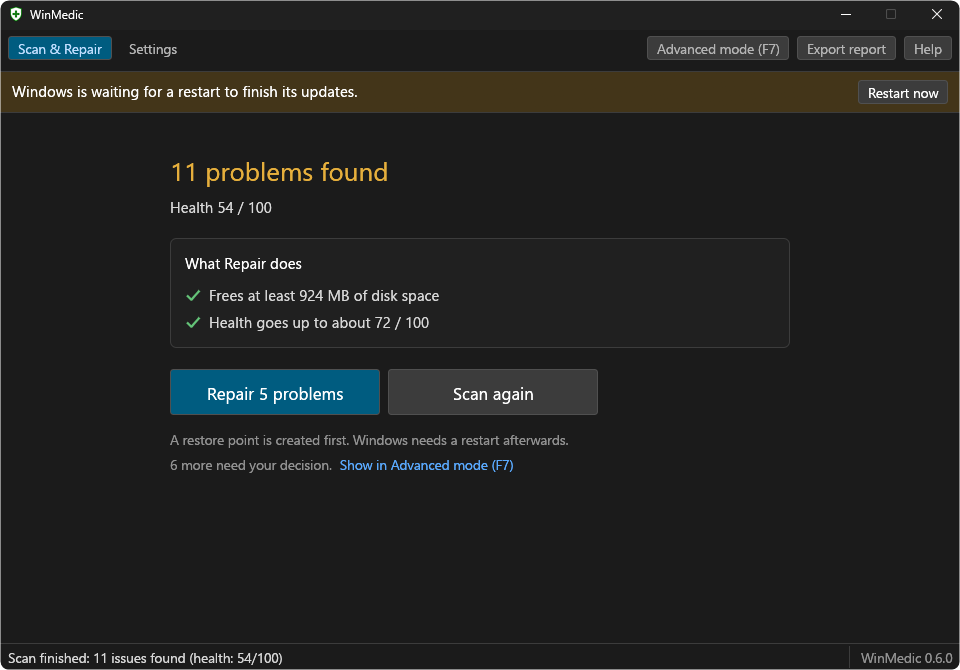
Three clicks, that's it
-
1
Start it
Run the .exe and confirm the Windows prompt. WinMedic needs admin rights to check and repair Windows. Nothing gets installed.
-
2
Scan
Takes a minute or two and changes nothing. After that you see how your PC is doing and what a repair would do.
-
3
Repair
WinMedic fixes what it can and tells you if Windows needs a restart. Want every detail? Press F7 for Advanced mode.
What it checks
12 areas, one scan.
System files
Damaged Windows files, the recovery environment, Start, Settings or the Store not opening.
Windows Update
Stuck update services and download caches, updates that keep failing and why.
Internet
A switched-off adapter, no IP address from the router, DNS problems, broken proxies.
Crashes
Blue screens, what changed in the week before they began, add-ons that crash Explorer.
Hardware
Processor, memory and PCIe errors Windows has logged.
Disk
File system errors, drive health, disk and controller errors, temporary files.
Startup
Autostart entries and scheduled tasks that point at deleted programs or keep failing.
Cleanup
Caches and leftovers that take up space.
Memory
A switched-off or too small page file.
Tweaks
Services, policies and Defender that "tweak" and debloat tools switched off.
Clock and restart
A wrong clock, a PC that has not been restarted for weeks.
Devices
Devices that stopped working or have no driver, a stuck print queue.
Exactly what each check looks at is in How WinMedic works.
Is it safe?
Scanning only reads
Nothing changes until you click Repair.
You can go back
Before a repair, WinMedic creates a Windows restore point and backs up the registry keys it touches.
You decide the risky stuff
Repairs that delete something you may want to keep, or that need a restart, are never picked for you.
No data collected
No telemetry, no account. WinMedic only goes online for updates, connection checks and clean system files during a repair.
Open source
All the code is on GitHub under GPL-3.0. Its checks are tested against output from real Windows installations.
Works in scripts too
For IT admins:
winmedic --scan,--auto-fixand--dry-runrun without the window.
Get WinMedic
Free. One file. Runs on 64-bit Windows 10 and 11.
WinMedic is not code-signed yet, so Windows may warn you the first time: click "More info", then "Run anyway". How to check the download first